Black Outdoor Self Order Kiosk: Features and Buying Guide for Commercial Projects
Outdoor self-service equipment must do more than display a digital menu. It needs to remain accessible in changing weather, provide a clear ordering interface, accommodate the right payment hardware, and fit the operating workflow of the business.
For quick-service restaurants, drive-through facilities, cafés, and other commercial service points, a black outdoor self order kiosk can combine customer interaction and transaction hardware in one freestanding unit. However, the right configuration depends on the installation environment, software platform, payment methods, and maintenance requirements.
This guide examines the main features of a black outdoor self order kiosk and explains what distributors, restaurant groups, and project integrators should check before purchasing.
1. What Is a Black Outdoor Self Order Kiosk?
A black outdoor self order kiosk is a freestanding interactive terminal that allows customers to browse information, select products, and complete supported self-service transactions. In a restaurant, this typically means selecting menu items and submitting an order. Depending on the application and configuration, the same hardware platform can also support payment or information services.
Unlike an indoor countertop ordering machine, an outdoor kiosk needs a structure designed around its installation conditions. Rain exposure, sunlight, temperature changes, public access, and long operating hours all influence the enclosure and component selection.
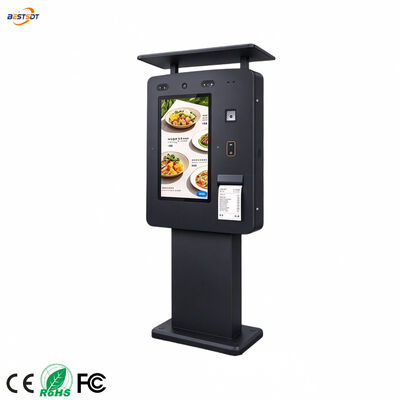
The BEST Technology Black Outdoor Self Order Kiosk features a cold-rolled steel enclosure, a toughened glass front panel, a protective top canopy, and a four-hole floor mounting base. Its modular configuration supports different screen sizes, computing platforms, and optional functional components.
For B2B buyers, the main advantage is configuration flexibility. Instead of treating the kiosk as a fixed package, the project team can specify the hardware around the actual service process.
2. Key Features of the Black Outdoor Self Order Kiosk
IP65 Protection for Outdoor Deployment
Outdoor kiosks can be exposed to rain, dust, and changing environmental conditions. The product is specified with an IP65 protection rating, making enclosure protection an important part of its outdoor design.
However, IP65 should not be interpreted as permission to install equipment in every possible environment without further assessment. The suitability of a specific installation also depends on cable entries, mounting, drainage, maintenance practices, and the conditions at the site.
Before placing a bulk order, buyers should request the applicable protection documentation and confirm that the selected configuration meets the requirements of the intended location.
For installations involving pressure washing, heavy water spray, coastal exposure, or unusual temperature conditions, explain those requirements to the manufacturer in advance.
Cold-Rolled Steel Enclosure and Protective Canopy
The black kiosk uses a thickened cold-rolled steel enclosure with an outdoor baking-paint finish. The rigid cabinet provides a structured housing for the display and internal hardware, while the top canopy helps shield the customer-facing area from direct exposure.
The four-hole floor mounting base is designed for fixed installation. Buyers should confirm the mounting dimensions, anchor arrangement, foundation requirements, and cable routing before preparing the installation site.
The black finish also suits contemporary restaurant exteriors, drive-through lanes, and commercial service areas where a consistent equipment appearance is important.
For multi-location projects, standardizing the enclosure color, mounting details, and hardware layout can simplify procurement and future replacement planning.
High-Brightness Touchscreen Display
Screen readability is a practical concern when customers need to interact with a kiosk outdoors. Reflections, direct sunlight, and viewing angles can affect how easily users read menu descriptions, prices, and order options.
The product page lists screen brightness options of 2,000 cd/m² and 2,500 cd/m², depending on configuration. Available display sizes include 21.5, 24, 27, and 32 inches. The listed platform supports 10-point multi-touch interaction, with 2K and 4K display options described on the product page.
The appropriate screen size depends on the menu layout and the distance between the customer and the display. A compact menu with a limited number of choices may work well on a smaller screen, while a larger menu with product images, modifiers, and promotional content may benefit from a larger display.
When evaluating a configuration, confirm the actual brightness, resolution, touch capability, and glass specifications for the model being quoted.
Flexible Computing Platforms
The kiosk supports processor options including Intel Core i3, i5, and i7, as well as selected Rockchip platforms such as RK3288, RK3566, and RK3399. Android and Windows options are also listed.
The correct combination depends on the ordering application rather than the processor name alone.
For example, an Android-based ordering application may require a specific system version and compatible peripheral drivers. A Windows-based solution may depend on a particular application framework, payment interface, or device driver.
Before finalizing the hardware, buyers should confirm the operating system, CPU, memory, storage, network interfaces, and peripheral compatibility with their software provider.
A configuration that works with one ordering platform may not automatically support another.
3. Payment and Scanning Modules: Choose by Workflow
One of the most important decisions in an outdoor kiosk project is the selection of functional modules. The correct hardware depends on how customers identify products, pay, receive confirmation, and interact with staff.
POS Terminal and QR Code Scanner
The product supports optional payment-related modules, including a POS terminal and QR code scanner. Barcode readers and product scanners are also listed as optional components.
These devices serve different purposes. A payment terminal processes supported payment transactions, while a QR code scanner may be used for payment codes, tickets, loyalty functions, or other software-defined workflows. A barcode reader can support product identification where the application requires it.
Buyers should document the exact transaction process before selecting modules. For example:
-
Will customers pay by card, contactless payment, QR code, or a combination?
-
Does the payment provider require a specific certified terminal?
-
Does the ordering application support the selected scanner?
-
Are additional interfaces, drivers, or software licenses required?
-
How will failed transactions and network interruptions be handled?
The physical presence of a POS terminal or scanner does not guarantee that it will work with every software platform. Confirm compatibility and test the complete transaction flow before production approval.
Optional Printer and Communication Components
Some self-service projects require a receipt printer, speaker, camera, or intercom. These components should be selected according to the operating process rather than added simply because they are available.
A printer may be necessary when customers need printed order numbers or receipts. An intercom may help customers contact staff at an unattended service point. A camera may support a defined operational or security requirement, subject to applicable privacy rules.
Each additional component affects the enclosure layout, power supply, cable routing, service access, and software integration.
For more detailed planning, see How Do You Choose Payment, QR Scanning, and Printer Modules for a Black Outdoor Self-Order Kiosk?.
4. Where Can a Black Outdoor Self Order Kiosk Be Used?
Quick-Service Restaurants and Cafés
Restaurants can use outdoor kiosks to provide an additional ordering point near an entrance, outdoor seating area, or designated pickup zone.
Customers can review the digital menu and submit orders through the interface, provided that the ordering software is integrated with the restaurant's order-management process.
The installation should account for customer queues, accessibility, menu visibility, and the distance between ordering and collection areas. A kiosk may simplify order entry, but the overall benefit also depends on kitchen capacity and order fulfillment.
Drive-Through Ordering
Drive-through projects require careful attention to vehicle approach, stopping position, screen height, and payment access. The kiosk must be positioned so drivers can use the interface without obstructing traffic or creating an unsafe reach.
Where voice communication is required, audio hardware and the communication workflow should be defined during project planning.
The mounting foundation, cable protection, and maintenance access also need to suit the site layout. A configuration designed for a pedestrian ordering point may not be appropriate for a vehicle lane without adjustments.
Car Washes and Self-Service Facilities
At car washes and other unattended service locations, kiosks may be used for selecting service packages, purchasing options, or accessing information. Payment and scanning requirements vary according to the business model.
These sites can expose equipment to water spray, cleaning chemicals, dust, and frequent public use. Buyers should specify the actual exposure conditions instead of relying on a general outdoor-use description.
For additional guidance, read Can a Black Outdoor Self-Order Kiosk Be Used in Rain, Sun, and Car Wash Environments?.
Retail and Public-Service Projects
The same configurable kiosk platform can be adapted for selected self-service and information applications in retail, visitor facilities, transportation locations, and other public spaces.
The required software and peripherals will differ from a restaurant ordering system. Buyers should therefore define the intended application before confirming the hardware configuration.
5. How to Select the Right Screen Size and Configuration
Screen size is only one part of the purchasing decision. A practical specification should consider the following factors.
Menu complexity: Count the categories, product options, photographs, and modifiers that users need to see. A more complex interface may require additional screen space.
Installation distance: Consider whether customers will stand directly in front of the display or interact with it from a vehicle.
Display readability: Confirm the required brightness and viewing conditions, especially for locations exposed to direct sunlight.
Module arrangement: Ensure the screen, payment terminal, scanner, printer, and communication components can be positioned for comfortable use and convenient maintenance.
Computing requirements: Match the processor and operating system to the application and connected peripherals.
Site constraints: Check available floor space, mounting dimensions, power access, network connectivity, and cable routing.
The product's listed screen options range from 21.5 to 32 inches. The best choice is the one that meets the user-interface, installation, and software requirements without adding unnecessary complexity.
6. OEM and ODM Customization for B2B Buyers
For distributors, restaurant chains, and system integrators, customization may be necessary to match a brand's appearance or an existing service workflow.
BEST Technology offers OEM/ODM options covering size, appearance, color, functional modules, and installation method. The kiosk can be specified around the required display, computing platform, payment hardware, scanning devices, and other supported components.
A well-defined customization process should include:
-
Project requirements: Identify the application, target market, installation environment, and expected operating schedule.
-
Hardware specification: Confirm display size, brightness, processor, operating system, and all required modules.
-
Mechanical design: Review cabinet dimensions, canopy, mounting holes, cable entry, and service access.
-
Software compatibility: Verify the ordering application and peripheral drivers with the selected configuration.
-
Prototype and testing: Evaluate the interface, payment flow, physical layout, and installation details before mass production.
-
Production planning: Confirm the approved bill of materials, quality checks, packaging, delivery schedule, and after-sales responsibilities.
The product page lists a typical batch-order delivery window of 15–30 days. Actual lead time should be reconfirmed based on order quantity, customization scope, component availability, and sample approval.
For B2B purchasing, a detailed specification and approved sample are more useful than a quotation based on the product name alone.
7. Outdoor Installation and Maintenance Considerations
Even a purpose-designed outdoor kiosk requires proper installation and routine maintenance.
Before deployment, verify the foundation and fixing points, power supply, grounding, cable routing, network connection, and required site protection. The kiosk should be positioned to support safe customer access without blocking pedestrian routes or vehicle movement.
A maintenance plan should cover the touchscreen, front glass, cabinet finish, canopy, mounting hardware, ventilation openings, and accessible connectors. Cleaning methods should follow the manufacturer's guidance to avoid damaging the display or enclosure finish.
Software and peripheral checks are equally important. Confirm that the ordering application starts correctly, connected devices are recognized, network interruptions are handled appropriately, and updates can be performed under an agreed maintenance procedure.
For installations across multiple locations, standard maintenance records and a defined spare-parts plan can make service management easier.
Frequently Asked Questions
Is the black outdoor self order kiosk rated IP65?
Yes. The product page specifies IP65 protection. Buyers should request the relevant documentation and confirm that the rating applies to the final selected configuration and intended installation.
What screen sizes are available?
The listed options are 21.5, 24, 27, and 32 inches. Confirm the available resolution, brightness, touch configuration, and other display details for the required model.
Can the kiosk support different payment methods?
The platform lists optional POS terminals and QR code scanners, along with other configurable modules. Actual payment methods depend on the payment hardware, provider, software, and target market.
Does the kiosk support Android and Windows?
Both Android and Windows options are listed. Processor and operating-system combinations should be confirmed with the supplier to ensure compatibility with the intended ordering application.
Can the kiosk be customized for a restaurant chain?
Yes. OEM/ODM customization options include size, appearance, color, functional modules, and installation method. The final specification should be approved before production.
Conclusion
A black outdoor self order kiosk needs to combine suitable outdoor protection, readable touchscreen performance, compatible computing hardware, and the right transaction modules. The enclosure and mounting design must also fit the installation environment and maintenance plan.
For restaurant groups, equipment distributors, and system integrators, the most effective purchasing approach is to define the complete workflow first and then select the hardware around it.
BEST Technology provides configurable black outdoor self-order kiosk solutions for commercial projects, with options for display size, computing platform, payment and scanning modules, and OEM/ODM customization.
Planning an outdoor self-service project? Visit the BEST Technology Black Outdoor Self Order Kiosk product page to discuss the required configuration, application, and project specifications.


 귀하의 메시지는 20-3,000 자 사이 여야합니다!